

AI can make CRM systems more useful, faster and increasingly autonomous.
It can help teams:
- research prospects;
- summarise customer histories;
- draft communications;
- qualify leads;
- update CRM records;
- trigger workflows;
- support customer service;
- analyse pipeline activity;
- and coordinate tasks across marketing, sales and service.
But the more responsibility AI receives, the more important governance becomes.
An AI assistant drafting a private internal summary creates a very different level of risk from an AI agent that can access customer records, send messages or change information inside your CRM.
That is why AI governance should not be treated as paperwork to complete after implementation.
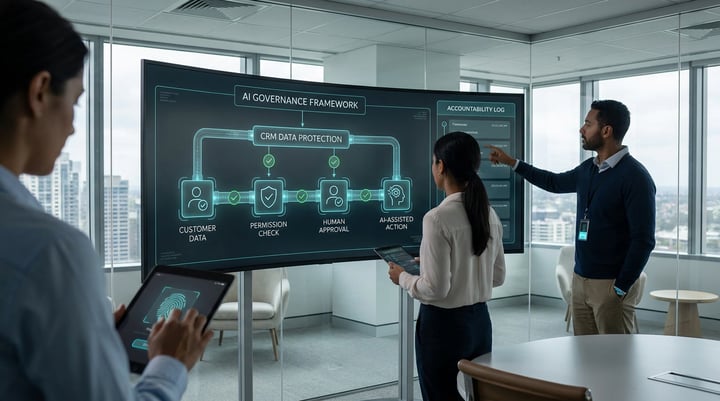
It should define what AI can access, what it can do, who remains accountable and where human judgement must stay involved.
What is AI governance?
AI governance is the set of rules, responsibilities, controls and review processes that determine how AI is selected, implemented, used and monitored inside an organisation.
For CRM-connected AI, governance should answer questions such as:
- Which AI tools are approved?
- What customer information can AI access?
- Which employees can activate or configure AI?
- What actions can AI perform?
- Which actions require human approval?
- Who owns the underlying data?
- Who is accountable for AI-generated outputs?
- How are errors identified?
- How is AI activity monitored?
- What happens when an AI system is uncertain?
- How are incidents escalated?
Good governance provides clear answers before AI becomes deeply embedded in customer-facing workflows.
Why CRM makes AI governance particularly important
CRM systems often contain some of the most valuable and sensitive operational information in a business.
That can include:
- contact details;
- customer history;
- sales activity;
- deal information;
- support records;
- communication history;
- marketing preferences;
- lifecycle information;
- company records;
- and internal notes.
When AI connects to this information, it gains context. That context can make AI significantly more useful.
But it also increases the potential impact of:
- poor data;
- incorrect permissions;
- inappropriate automation;
- inaccurate outputs;
- privacy failures;
- or actions taken without adequate human oversight.
The question therefore changes from:
“Can AI connect to our CRM?”
to:
“What should AI be allowed to access and do once it is connected?”
Start with the use case, not a generic AI policy
AI governance works best when it is connected to the actual use case.
Consider three examples.
Low-risk use case
An employee uses AI to summarise notes from a meeting before manually updating the CRM.
The AI assists.
The employee reviews the result and decides what enters the CRM.
Medium-risk use case
AI reviews CRM information and drafts a personalised sales follow-up.
A salesperson reviews and approves the communication before it is sent.
Higher-risk use case
An AI agent accesses customer history, updates CRM fields, triggers workflows and communicates directly with customers. The AI now has significantly more autonomy. These scenarios should not automatically have identical controls.
Governance should be proportionate to the risk, autonomy and customer impact of the use case.
1. Define approved AI tools
Employees need to know which AI systems they are allowed to use.
Without clear guidance, teams may independently introduce tools because they appear useful.
That can make it difficult for the organisation to understand:
- where customer information is being processed;
- which systems retain data;
- which integrations exist;
- what permissions have been granted;
- and who is responsible for the tool.
Maintain a clear view of:
- approved platforms;
- approved integrations;
- authorised administrators;
- permitted use cases;
- and tools that should not be used with company or customer data.
2. Understand what data AI can access
AI should not automatically receive access to every CRM record simply because an integration makes that technically possible.
Start with the principle of:
Only give AI access to the information required for the use case.
Review:
- which CRM objects are needed;
- which properties are needed;
- whether sensitive information exists;
- what information employees can currently access;
- whether AI should inherit those same permissions;
- and whether different AI workflows require different levels of access.
The objective is useful context without unnecessary exposure.
3. Clarify data ownership
Someone should be accountable for the quality and definition of important CRM information.
For example:
Who owns:
- lifecycle stages;
- lead status;
- customer information;
- deal stages;
- consent data;
- support categories;
- product information;
- or reporting definitions?
If nobody owns the data, errors can remain unresolved because nobody is responsible for fixing them.AI governance therefore depends on data governance as well.
4. Check CRM data quality before increasing AI autonomy
AI can make poor information move faster.
Imagine an AI system working from:
- duplicate records;
- outdated lifecycle stages;
- incomplete contact information;
- inconsistent deal stages;
- incorrect properties;
- or conflicting information across systems.
The AI may still produce a confident result.
But the result is only as trustworthy as the context underneath it.
Before increasing AI autonomy, review whether the information required for the use case is:
- accurate;
- current;
- complete enough;
- consistently structured;
- accessible;
- and trusted.
Data readiness is use-case specific.
You do not need every CRM property to be perfect before using AI.
You do need the data required for the chosen workflow to be reliable enough for the level of risk involved.
5. Control what AI is allowed to do
Access and action are different things.
An AI system may be permitted to read customer information without being allowed to change it.
For every CRM-connected use case, define whether AI can:
- view;
- summarise;
- recommend;
- draft;
- create;
- update;
- delete;
- trigger;
- communicate;
- or make a decision.
The greater the impact of the action, the stronger the required control should generally become.
For example:
AI recommending a change to a CRM property is different from AI updating that property automatically.
AI drafting a customer email is different from AI sending it without review.
Make those boundaries explicit.

6. Define human review points
Human oversight should be designed into the workflow.
Do not simply say:
“A human remains in the loop.”
Define what that actually means. Who reviews the output? What are they checking?When must they intervene? What happens when the AI is uncertain? Can the reviewer stop or reverse the action?
Examples of human review points may include:
- approving external communications;
- reviewing high-value deal decisions;
- validating sensitive record changes;
- approving exceptions;
- reviewing low-confidence outputs;
- or handling emotionally sensitive customer interactions.
Human oversight is useful only when the person reviewing the AI has enough context, authority and time to intervene.
7. Define accountability
AI does not remove organisational accountability.
Someone should remain responsible for:
- the use case;
- the data;
- the workflow;
- the technology;
- the customer impact;
- and the outcome.
Clarify roles such as:
Business owner
Responsible for the business outcome.
Data owner
Responsible for the information supporting the workflow.
System owner
Responsible for configuration and technical operation.
Risk or governance owner
Responsible for controls and policy.
Human reviewer
Responsible for reviewing decisions or outputs where required.
Clear ownership prevents accountability disappearing between teams.
8. Create risk levels for different AI use cases
Not every AI initiative carries the same level of risk.
A practical organisation might classify use cases as:
Lower risk
Internal brainstorming, summarisation or drafting where employees review the result.
Moderate risk
AI using customer information to produce recommendations or communications with required human approval.
Higher risk
AI taking autonomous customer-facing actions, changing important records or making decisions that materially affect people or business outcomes.
Risk classification helps determine:
- approval requirements;
- data access;
- human oversight;
- monitoring;
- testing;
- and documentation.
9. Build privacy and sensitive-data rules into the workflow
CRM data can include personal and commercially sensitive information.
Employees and AI systems need clear guidance about:
- what data can be processed;
- where it can be processed;
- who can access it;
- how long it should be retained;
- whether the AI provider may store or reuse it;
- and what restrictions apply to sensitive information.
These rules should be translated into actual technical permissions and workflow design wherever possible.
Do not rely entirely on employees remembering a policy document.
10. Make AI activity traceable
For important AI workflows, teams should be able to understand:
- which information the AI used;
- which action it performed;
- when the action happened;
- why an escalation occurred;
- which human approved the action;
- and what happened afterwards.
Traceability makes it easier to investigate errors.
It helps answer:
Was the problem caused by the AI model, the CRM data, the workflow or the human decision?
Without traceability, those problems become much harder to diagnose.
11. Monitor the AI after launch
Governance does not end when the workflow goes live.
Monitor:
- output quality;
- errors;
- exceptions;
- customer complaints;
- failed actions;
- human overrides;
- unusual behaviour;
- data-quality issues;
- and whether the workflow is still delivering the intended outcome.
AI systems, source information, workflows and business requirements change over time.
Controls should evolve with them.
12. Define what happens when something goes wrong
Every significant AI workflow should have an escalation path.
Ask:
- What happens if the AI produces an incorrect output?
- What happens if the source data is wrong?
- Can the action be reversed?
- Who is notified?
- Should the workflow automatically stop?
- What needs to be documented?
- How is the cause investigated?
- Who decides when the workflow can restart?
An incident process turns governance into something operational rather than theoretical.
How AI governance connects to the Five Pillars
Governance is one of Lupo’s Five Pillars of AI Transformation, alongside: People; Process; Technology; and Data. They are closely connected. Together, these five foundations form part of the broader Lupo AI approach to preparing organisations to adopt, implement and scale AI responsibly across real business systems and workflows.
People
Employees need to understand the rules and their responsibilities.
Process
Workflows need approval, review and escalation points.
Technology
Systems need permissions, controls and monitoring.
Data
AI requires reliable information and clearly defined access.
Governance
The organisation defines what is permitted, who is accountable and how AI is controlled.
A weakness in one pillar can undermine the others.
A practical AI CRM governance checklist
Before expanding an AI workflow connected to your CRM, confirm:
Use case
- Is the business purpose clear?
- Is AI actually appropriate?
Data
- Are trusted data sources defined?
- Is there a data owner?
- Is the required information reliable?
Access
- Does AI have only the access it needs?
- Are permissions documented?
Actions
- Is it clear what AI can and cannot change?
Human review
- Are appropriate approval points defined?
Accountability
- Is there a named business owner?
Risk
- Has the use case been classified based on potential impact?
Privacy
- Are sensitive-data requirements understood?
Monitoring
- Can AI activity and outcomes be reviewed?
Incidents
- Is there a clear process if something goes wrong?
If those answers are unclear, it may be too early to give the AI more autonomy.
Frequently Asked Questions

Written by Glenn Miller
An exceptionally experienced digital marketer, proactive and future-forward thought leader, I deliver exceptional customer experiences, industry leading digital strategy and superior marketing results.

