

If May was about connecting your tools, June is about making the AI inside HubSpot genuinely useful. This month’s updates take Breeze Assistant from a helpful sidekick to something closer to a real teammate, one that asks the right questions, builds your products, drafts your emails in a proper workspace, and even reads your campaign data.
And it’s not just AI. TikTok leads now flow straight into your CRM in real time, multi-step forms finally validate the way visitors expect, and customer success teams get structured onboarding plans built right into HubSpot.
We’ve gone through all seven updates and pulled out what actually matters for your business. Here’s the breakdown.
1. TikTok Lead Syncing: Stop Losing Leads Inside TikTok
What is it?
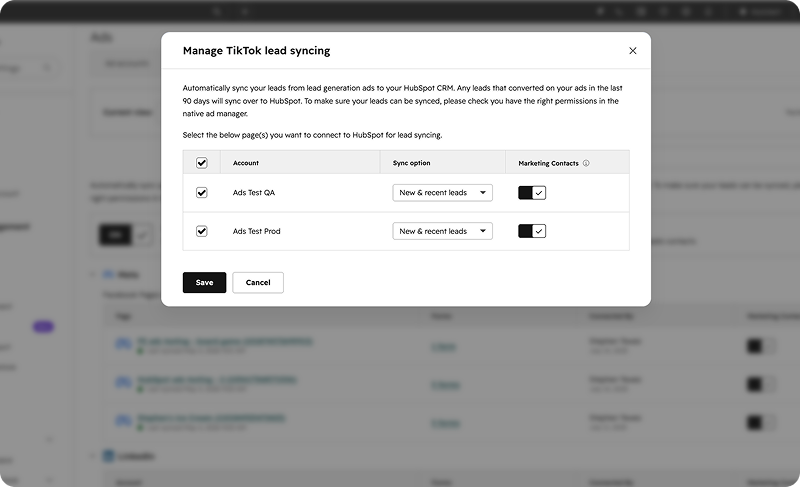
TikTok Lead Syncing connects your TikTok ad account directly to HubSpot. When someone fills out a TikTok Instant Form, HubSpot automatically creates or updates a contact in your CRM with the information they submitted in real time.
Why it matters
TikTok lead generation ads let people fill out a form without ever leaving the app or visiting your website. The problem? Without syncing, those leads stay trapped inside TikTok, forcing your team to manually export and import them — which means delays and lost opportunities.
Speed-to-lead is everything. The faster you follow up, the higher your conversion rate. By syncing TikTok leads into HubSpot instantly, your team can engage straight away through workflows, sequences, and sales follow-ups.
How it works
-
Go to Marketing > Ads, then click the Settings gear icon.
-
Open the Lead Syncing tab, click Connect, and select the TikTok icon.
-
Choose the TikTok account to connect.
-
Pick your sync range, new and recent leads (past 90 days) or new leads only.
-
Choose whether to enable marketing contacts for synced leads, then click Save.
Available for: all HubSpot Marketing Hubs and tiers.
Lupo's take: This is the standout update for any team running paid social. TikTok is a serious lead-gen channel now, and the gap between “lead submitted” and “lead in your CRM” was costing real money. Pair this with a workflow that fires an instant follow-up and you’ll feel the difference in conversion. Talk to Lupo Digital.
2. Create, Edit and Analyse Products in Breeze Assistant
What is it?
You can now analyse, create, and edit products directly through Breeze Assistant in the sidebar, including complex pricing like tiered structures. Instead of digging through records, you just ask Breeze conversationally.
Why it matters
Products sit at the heart of every deal and quote, but building them correctly and understanding how a change affects a deal can be slow, especially for newer reps or complex catalogues. Breeze removes that friction. Reps spend less time on data entry and more time selling, with confidence that their line items are accurate because Breeze can explain exactly what each item represents and how pricing was calculated.
How it works:
There are three core capabilities if you use a product catalogue:
Explaining products - “What pricing tiers exist for the Enterprise Licence?” Breeze gives a plain-language breakdown of what’s included, how pricing works, and any relevant settings.
Creating products - “Create a product called Enterprise Licence priced at $500/month.” Breeze sets it up; you review and confirm before it saves.
Editing products - “Add a tier to the Enterprise Licence: 11–50 seats at $400/seat.” Breeze builds the tier structure and shows a summary before saving. You can keep iterating conversationally.
Available for: all hubs and tiers.
Lupo's take: Quoting is one of the most error-prone parts of the sales process. Letting reps build and sanity-check products in plain language is a genuine win for accuracy, especially for teams with complex or tiered pricing.
3. Create and Refine Emails in Breeze Assistant (Canvas)
What is it?
Breeze Assistant can now open email drafts in a dedicated canvas panel alongside the chat. The canvas becomes a persistent workspace where you review, refine, copy, or send the email directly from Breeze.
Why it matters
Until now, Breeze email drafts lived inside the chat thread, so as you iterated, earlier versions scrolled out of view and editing got messy. Breeze Canvas gives you a proper workspace to refine drafts through conversation or direct editing, without losing context between turns.
How it works
-
Ask Breeze to draft an email; it appears in the chat.
-
Click the draft to open it in Breeze Canvas alongside the chat.
-
Refine with instructions like “make this shorter” or edit directly inside the canvas.
-
Each change saves as a new version, restore earlier ones from the version history dropdown.
-
Copy the email or send it directly from the canvas without leaving Breeze.
Available for: All hubs and tiers.
Lupo's take: Version history is the quiet hero here. Anyone who’s lost a good draft to “one more tweak” will appreciate being able to roll back. This makes Breeze viable for real, considered emails, not just quick replies.

4. Breeze Assistant Now Asks Focused Clarifying Questions
What is it?
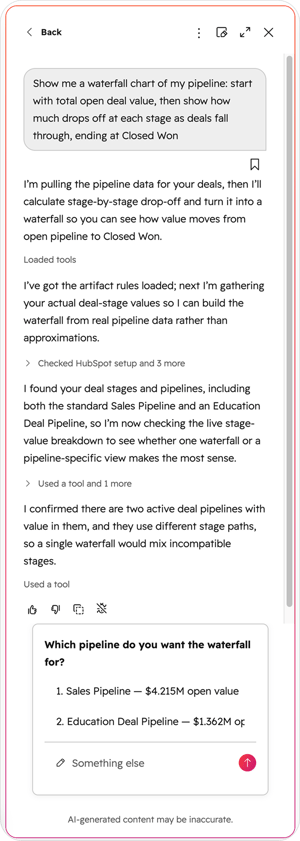
When Breeze needs a key piece of information, like how your team defines “stalled” or which output format you want, it now pauses and shows a focused question card right in the chat. You pick from options or type your own answer, and Breeze continues immediately.
Why it matters
Without this, Breeze could either silently guess at your business definitions (and be confidently wrong) or dump a wall of clarifying questions before doing anything. A single interactive question card gets the context it needs in one click and keeps the conversation moving.
How it works
-
When Breeze needs clarification, the chat input is replaced by a question card.
-
The card shows numbered options, radio buttons for single answers, checkboxes when multiple apply.
-
A free-text field is always available for a custom answer.
-
For multiple questions, a progress indicator (e.g. 1 / 2) appears with Previous, Next, and Skip.
-
Keyboard shortcuts: number keys select, Enter advances, Escape dismisses, arrows navigate.
Available for: All hubs and tiers.
Lupo's take: This is a small change with a big effect on output quality. Most “bad AI answers” come from the AI guessing at missing context. Asking one sharp question instead is exactly how a good human teammate works.
5. Breeze Assistant Can Now Read Your Campaign Data
What is it?
Breeze Assistant now answers questions about your campaign’s goals, performance metrics, assets, and budget, directly within Breeze.
Why it matters
Previously you had to switch between multiple tabs and reports to understand campaign performance or asset readiness. Now all your key campaign data lives in one conversation, so you stay focused on strategy instead of hunting for numbers.
How it works:
-
Go to Marketing > Campaigns and open any campaign.
-
Click the Breeze Assistant icon in the side panel.
-
Ask about goal progress, asset readiness, or budget or ask campaign questions from anywhere in HubSpot.
Available for: Marketing Hub Pro and Enterprise.
Lupo's take: For marketers juggling several live campaigns, this is a real time-saver. “How’s the Q3 webinar campaign tracking against goal?” answered in one line beats clicking through four reports
6. Step-by-Step Form Validation
What is it?
Multi-step forms in the new Forms Editor now enforce required fields at each step. Visitors see validation errors immediately and must resolve them before continuing giving you cleaner, more reliable data.
Why it matters
Previously, validation only happened at final submission, so visitors could move through steps without completing required fields, leading to late-stage errors and confusion. With step-level validation, visitors get feedback exactly when they need it, conditional logic behaves more reliably, and your forms match what people expect.
To balance data quality with conversion, the editor also includes tooltips and optimisation recommendations that flag when required fields might add friction especially on early steps.
How it works:
-
Required fields must be completed with valid input on each step.
-
Missing or invalid info triggers inline guidance showing what needs attention.
-
Progression to the next step unlocks once all required fields are valid.
Available for: all hubs and tiers.
Lupo's take: Cleaner data and a smoother visitor experience in one update. Just watch the early steps, too many required fields up front can cost you conversions, and HubSpot’s new tooltips will warn you when that’s a risk.
7. Onboarding Plans for Customer Success Teams
What is it?
BCustomer success teams can now plan, execute, and track onboarding and success projects with structured tasks, milestones, and reporting directly in HubSpot.
Why it matters
Onboarding workflows are often fragmented across multiple tools and objects. This brings everything into one place, giving clear visibility into status, risks, and progress across every customer, and supporting scalable, repeatable processes.
How it works:
-
Manage projects from the customer success workspace in HubSpot.
-
A new “Onboarding” pipeline is created by default for all new Service Hub customers.
-
A new “Service Onboarding” project type populates Customer Success Rooms and default reports.
- Five out-of-the-box reports cover projects per stage, time in stage, planned vs actual timeline, status distribution, and engagement distribution.
Available for: Service Hub Professional and Enterprise.
Lupo's take: TA strong step for service teams. Consistent onboarding is one of the biggest drivers of retention, and having it structured and reportable inside HubSpot rather than scattered across spreadsheets makes that far easier to deliver
What These Updates Mean for Your Business
There’s a clear theme this month: HubSpot is making AI do more of the real work. Breeze went from answering questions to building products, drafting emails in a proper workspace, reading campaign data, and asking smarter questions. Around that, the practical wins, TikTok lead syncing, smarter forms, and structured onboarding remove friction from the moments that directly affect revenue and retention.
The teams that switch these on early will compound the advantage. Faster lead follow-up, cleaner data, more accurate quotes, and better-onboarded customers all add up month over month.
Need Help Putting These Features to Work?
At Lupo Digital, we help businesses turn HubSpot updates into measurable results not just new buttons in your portal. Whether it’s wiring up TikTok lead syncing, building smarter forms, or training your team on Breeze Assistant, we’re ready to help
Book a chat
There’s nothing to lose from a 10 minute connect-call. Tell us your pain... let’s see if we can help...


And if you want these updates delivered to your inbox every month, subscribe to Product Features of the Month
Related reading:

Written by Glenn Miller
An exceptionally experienced digital marketer, proactive and future-forward thought leader, I deliver exceptional customer experiences, industry leading digital strategy and superior marketing results.

