


June was about making HubSpot’s AI useful. July is about pointing it at the top of your funnel. The headline update this month is the new HubSpot Prospecting Agent. It now connects to Seamless, finds net-new contacts that match your target personas, and drafts the outreach for you.
Alongside this update, HubSpot has introduced a range of practical enhancements. WhatsApp now has its own dedicated workspace, the Microsoft Teams integration has been significantly enhanced, Breeze Projects has evolved into a true collaborative workspace for teams, and there are valuable usability improvements across the mobile app, video functionality, and social media tools.
We’ve been through all of this month’s releases and pulled out what actually matters for your business. Here’s the breakdown.
1. The HubSpot Prospecting Agent Now Finds Contacts for You
The HubSpot Prospecting Agent is the standout update this month and the one worth setting up first if you have access.
What is the HubSpot Prospecting Agent?
The HubSpot Prospecting Agent now connects to Seamless and searches its database to find contacts that match your selected personas. In plain terms, it finds people who fit your ideal customer profile but aren’t in your CRM yet, adds them for you, and drafts the first outreach.
Why it matters
Prospecting is one of the most time-consuming parts of sales: hunting through external databases by hand, copying details into the CRM, then writing cold outreach from scratch. The HubSpot Prospecting Agent removes all three steps. It identifies net-new contacts that match your personas, lets you add them to the CRM in a click, and drafts the outreach so your reps can spend their time selling instead of searching.
How does the HubSpot Prospecting Agent work?
- If you’re in the Prospecting Agent public beta, connect to Seamless via OAuth from within the agent.
- The agent searches Seamless for people who match your selected target personas.
- It surfaces suggested net-new contacts that aren’t already in your CRM.
- Add the ones you want to the CRM, and let the agent draft the outreach.
Available for: Customers enrolled in the Prospecting Agent public beta.
Lupo's take: This is the one to prioritise. Prospecting is where sales teams lose the most hours, and an agent that finds persona-matched, net-new contacts and drafts the outreach is a genuine force multiplier. If you’re not in the beta yet, it’s worth requesting access and getting your personas sharp first, because the quality of what it finds depends entirely on how well your personas are defined. Talk to Lupo Digital.
2. WhatsApp Home: A Proper Place for WhatsApp in HubSpot
What is it?
HubSpot’s WhatsApp integration now has its own dedicated Home, sitting alongside your other core messaging channels. It brings a new WhatsApp messaging management page, a template management experience, and a full reporting suite into one place.
Why it matters
WhatsApp has been a powerful but slightly buried channel in HubSpot. Giving it a dedicated home makes it more discoverable and far easier to manage day to day. You can find, manage, and report on WhatsApp the same way you already do with email and other messaging channels, with much less friction.
How it works:
- Log in to HubSpot and go to CRM in the left-hand panel, then click Templates to see the new Manage page.
- Template manager: view the status of each template and filter by message type, team, WABA, and status; manage and select templates to send.
- Reporting suite: view delivery, engagement, clicks, over-time comparisons, opt-outs, and detailed messaging errors.
Available for: Marketing Hub and Service Hub — Professional and Enterprise.
Lupo's take: If WhatsApp is part of how you talk to customers, and in a lot of markets it absolutely is, this makes it a first-class channel in HubSpot rather than an afterthought. The reporting suite is the standout: proper visibility into delivery and engagement is what lets you actually optimise the channel.
3. Microsoft Teams Integration: Smarter Notifications and Better Call Logging
What is it?
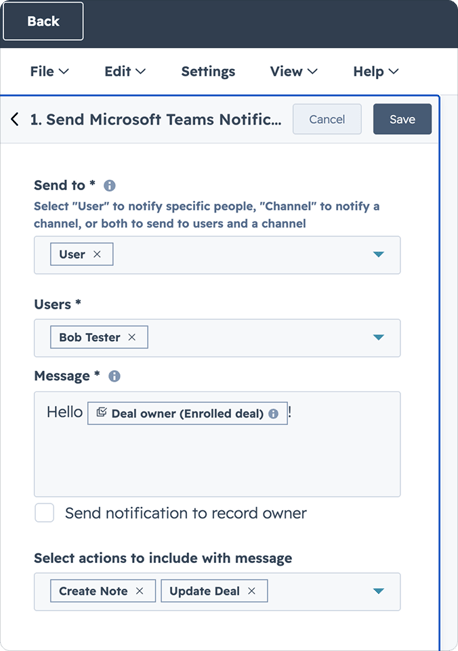
The HubSpot Microsoft Teams integration gets a set of upgrades across workflow notifications, call logging, and app management, giving you more precise and flexible ways to connect Teams and your CRM.
Why it matters
Until now, automating notifications and logging calls through the Teams integration was limited. These updates make it far more useful: you can target the right person across any part of your CRM and keep accurate records of multi-person calls.
What’s new
- Send workflow notifications to individual Microsoft Teams users, not just channels, making alerts more precise and actionable.
- Trigger Teams notifications from any HubSpot object type, not just contacts or deals.
- Log multi-participant Teams calls and associate them with all relevant participants, not just one contact.
- Upgrade from a user-level to an admin-level installation directly in settings, with no disconnect or reinstall needed.
Available for: All hubs and tiers. Professional and Enterprise across the suite.
Lupo's take: The individual-user notifications and multi-participant call logging are the real wins here. If your team runs on Teams, these updates close the gaps that used to force manual workarounds, especially for accurate call records on group calls.

4. Breeze Projects Becomes a Real Team Workspace
What is it?
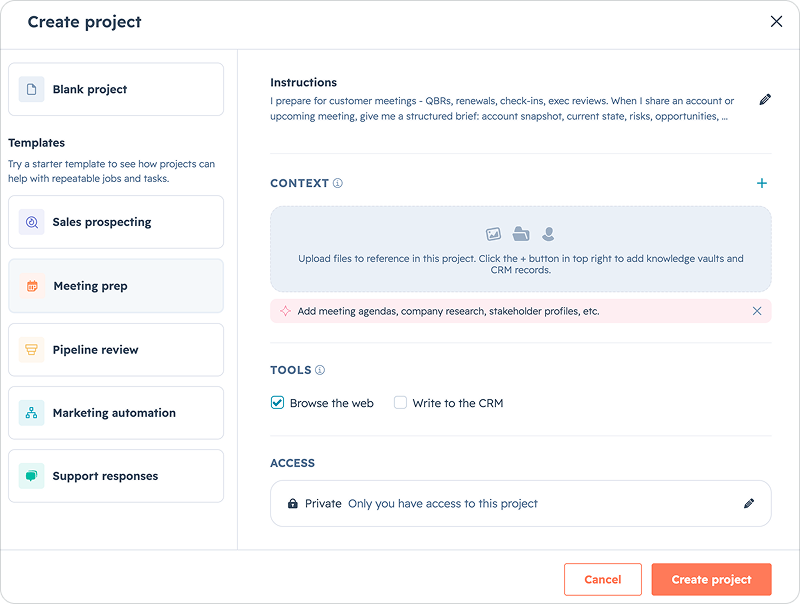
Breeze Projects had two upgrades this month that together turn it into a proper collaborative workspace. You can now share projects with teammates and control permissions, start from pre-configured templates, upload files directly, @mention CRM records as references, and let Breeze use built-in tools to search the web and write to your CRM, with project memory carrying context across every thread.
Why it matters
A project gets far more useful when the whole team works from the same context. Sharing means everyone sees the same instructions, knowledge, and references, so Breeze gives consistent answers across the team. Templates solve the blank-page problem, project memory stops you repeating yourself, and with tools switched on, Breeze doesn’t just understand your context — it acts on it.
How it works
- Start a project from a pre-configured template, such as sales prospecting, meeting prep, or customer support, with preset instructions and suggested knowledge.
- Share a project and control who can view, edit, or manage it.
- Upload PDFs, documents, spreadsheets, or images. Breeze references them across every thread.
- Type @ to reference a contact, company, deal, or ticket as a guided reference.
- Turn on tools so Breeze can search the web and write to your CRM directly from the conversation.
- Project memory remembers preferences and decisions. You can manage it under Memories, filtered by Project.
Available for: All hubs and tiers.
Lupo's take: Think of a Breeze Project as a shared brief that stays pinned to every conversation. For campaign planning, prospecting, or any initiative that spans multiple sessions and people, this is where Breeze starts to feel like a teammate rather than a chatbot.
5. Customer Agent: Multi-Brand Support and “Test as a Contact”
What is it?
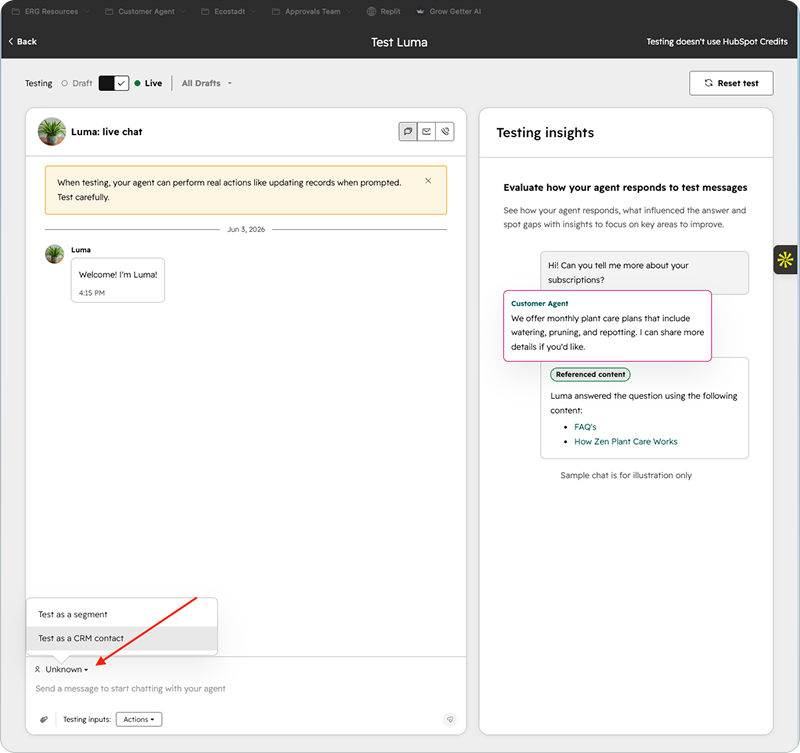
The Customer Agent got two meaningful upgrades. Multi-brand support lets organisations run a distinct agent per brand within one portal, each with its own identity, voice, knowledge, and reporting. “Test as a Contact” lets you run a test as a specific type of customer, so you can see exactly how your agent responds to real people with real CRM properties.
Why it matters
For multi-brand companies, a single agent can cause tone, knowledge, and context leakage, with the wrong voice or information showing up in the wrong conversation. Multi-brand support gives each brand complete separation. And because most of your real customers aren’t anonymous, “Test as a Contact” closes a real gap: you can now confirm your agent behaves correctly for known customers with real properties, instead of always testing as a stranger.
How it works:
- Multi-brand: create, name, and configure an agent per brand, with complete knowledge and tone isolation and clear channel deployment controls. This requires the Brands add-on.
- Test as a Contact: clone an existing CRM contact to test against their real properties, or create a test contact from scratch to simulate any scenario without cluttering your CRM.
Available for: Professional and Enterprise across Marketing, Sales, Service, Content, Data, and Smart CRM. Multi-brand requires the Brands add-on.
Lupo's take: “Test as a Contact” is the quiet winner. Testing your agent as a real customer type is how you catch issues before your customers do. And for any agency or group running multiple brands, proper brand isolation removes a genuine risk of embarrassing cross-brand mix-ups.
6. Predicted Email Engagement in Segments
What is it?
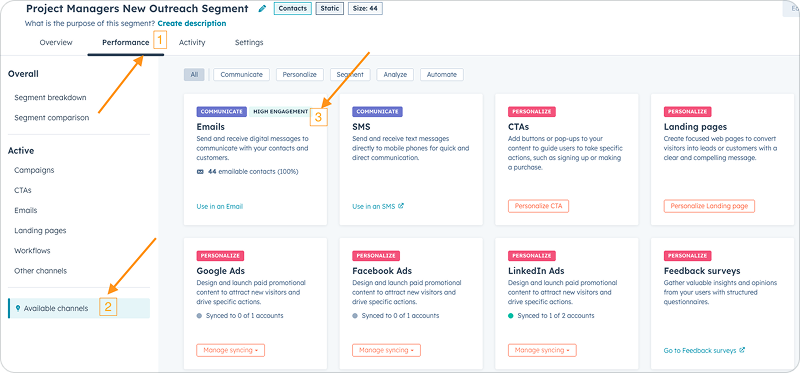
You can now see how a segment of contacts is predicted to perform in an email, based on the historical engagement of the contacts in that segment, before you hit send.
Why it matters
Email performance depends on your audience, not just your content. Instead of guessing or manually building reports of past results, you can now predict segment-level performance up front and focus your effort on the high-potential segments.
How it works:
- Open or create a contact segment. Predicted engagement appears in the Overview and under the Performance tab.
- HubSpot compares the segment’s past engagement to the average across your whole instance.
- Each segment is rated High, Medium, Low, or Unknown for expected email engagement.
Available for: All hubs and tiers.
Lupo's take: A neat way to sanity-check a send before it goes out, and directly relevant to work like our own PFOTM list, where knowing a segment’s likely engagement helps you decide who to prioritise.
7. Association Action Targeting for Connected Records
What is it?
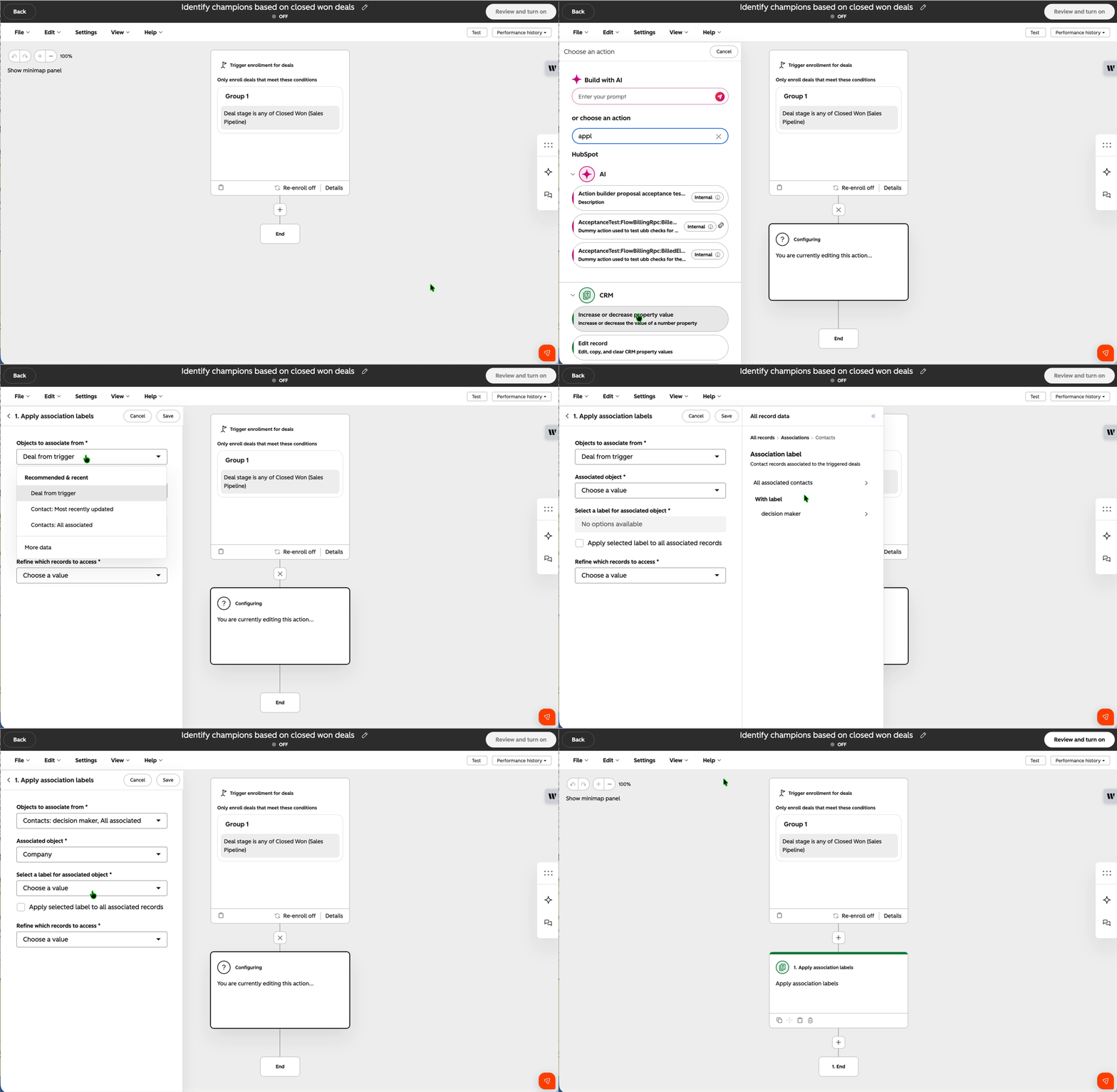
When using association actions in workflows, you can now target associated records of the enrolled record, not just the enrolled record itself. For example, enrol deals when they move to Closed Won, then act on the contacts associated with those deals.
Why it matters
Managing relationships across your CRM often means updating records connected to the enrolled one. Previously, that needed separate workflows or manual updates. Now you can automate association updates across connected records in a single workflow. For instance, you could automatically mark the decision-makers on a won deal as champions at their company for future upsell.
How it works:
- In Automation > Workflows, open or add an association action.
- In the “Objects to associate from” field, click More data to expand targeting options.
- Target all associated records, the most recently associated record, or a specific associated record.
Available for: Professional and Enterprise across the suite.
Lupo's take: A powerful one for anyone building serious automation. Being able to act on connected records in a single workflow removes a whole category of clunky multi-workflow workarounds, which is great for tracking key influencers and driving upsell.
8. Mobile Meeting Prep, Powered by Breeze
What is it?
HubSpot Mobile has a redesigned Meeting Detail Page: one surface showing attendees, conference link, location, linked deals, and internal notes. A new Prep button generates a Breeze-powered briefing on demand from your CRM activity, deal context, and contact history.
Why it matters
The old meeting page buried the useful information and forced reps to leave the app to piece together context before a meeting. The redesign puts the essentials front and centre, adds a maps widget for directions, and the Prep tab builds a full briefing in seconds: recent calls, emails, deal stage, open tasks, and decision-maker context right when the rep needs it.
Available for: All hubs and tiers, iOS and Android using the latest app version.
Lupo's take: For any rep who runs client meetings on the go, this is the kind of feature that quietly becomes essential. Tapping one button for a full briefing on the way into a meeting beats scrambling through records in the car park.
9. Instagram Publishing Requirements Now Reflected in the Social Tool
What is it?
HubSpot’s Social tool has been updated so its publishing checks now mirror Instagram’s latest API requirements for video, images, and captions. That means fewer failed posts and clearer warnings before you hit publish, rather than errors after.
What changed
- Reels: max file size is now 300 MB, with a new 25 Mbps bitrate limit and a minimum frame rate of 23 fps.
- Feed videos: max aspect ratio updated to 1.91:1.
- Stories: minimum aspect ratio 0.1:1, with a composer error instead of a publish failure.
- Images: warning if narrower than 320px or wider than 1440px.
- First comments: mention limit raised to 20 accounts, with audio validation added for channel count.
Available for: Marketing Hub Professional and Enterprise.
Lupo's take: Directly relevant to our own social workflow. Catching a spec problem in the composer instead of at publish saves the frustrating “why did my Reel fail?” moment. It is worth a quick briefing to whoever schedules your Instagram content.
10. New Video Sharing Option: “Anyone With the Link”
What is it?
HubSpot video now has an “Anyone with the link” visibility setting. You can share a video via a private link that anyone can view without a HubSpot login, while keeping it off public search results.
Why it matters
Sending a video to a prospect should be as simple as sending a link: click, watch, no login required. But you might not want that video appearing in public search. Previously, you had to choose between fully public and HubSpot-only. This new setting does both: a seamless, no-login experience for your recipient, with the URL protected by an unguessable token and kept out of public indexes.
Available for: Marketing, Content, and Service Hub — Professional and Enterprise.
Lupo's take: Perfect for 1:1 sales and customer videos. It’s the sharing setting most people assumed already existed: frictionless for the viewer and private from search.
11. A Consolidated Dashboard Settings Panel
What is it?
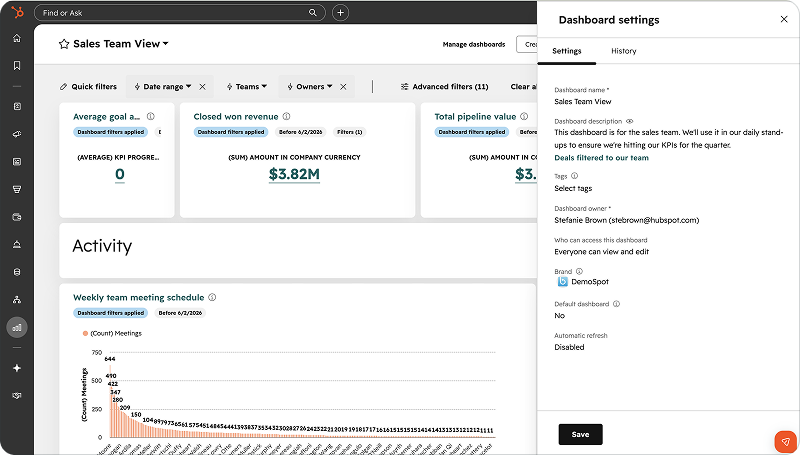
A single settings panel for managing a dashboard’s details: name, owner, access, description, tags, auto-refresh, and more, all in one place instead of scattered drop-downs and links.
What changed
- Open a dashboard and click the gear icon to open the settings panel.
- Edit name, owner, description, tags, and brand, and reassign ownership from the panel header.
- Adjust auto-refresh and set-as-default in the same panel. Use the History tab to see who changed what and when.
Available for: All hubs and tiers. Admin or dashboard owner permissions are required.
Lupo's take: A small but welcome tidy-up. If you manage a lot of dashboards, having everything in one panel, with a history log, saves time and makes ownership changes far cleaner.
FAQs About the HubSpot July 2026 Product Updates
What is the biggest HubSpot update in July 2026?
The biggest update is the HubSpot Prospecting Agent, which can find net-new contacts that match your target personas and draft outreach for your sales team.
What is WhatsApp Home in HubSpot?
WhatsApp Home is a dedicated workspace for managing WhatsApp templates, messages, reporting, delivery, engagement, clicks, opt-outs, and messaging errors inside HubSpot.
What changed with Breeze Projects?
Breeze Projects now works more like a shared team workspace, with project sharing, templates, file uploads, CRM record references, project memory, and tools that can search the web or write to the CRM.
Which HubSpot July 2026 update should sales teams prioritise?
Sales teams should prioritise the Prospecting Agent, Microsoft Teams call logging improvements, and mobile meeting prep because these updates directly reduce manual prospecting and meeting preparation work.
What July’s Updates Mean for Your Business
The theme this month is clear: HubSpot is pushing AI further up the funnel. The Prospecting Agent finds and drafts outreach to net-new customers, Breeze Projects turns AI into a shared team resource, and the Customer Agent gets safer and smarter. Around that, the channel and quality-of-life updates — WhatsApp Home, Teams, mobile prep, video, and social — remove friction from the moments that touch revenue.
As always, the teams that switch these on early compound the advantage. If prospecting is a bottleneck for you, the Prospecting Agent alone is worth exploring this month.
Need Help Putting These Features to Work?
At Lupo Digital, we help businesses turn HubSpot updates into measurable results, not just new buttons in your portal. Whether it’s setting up the Prospecting Agent, building out WhatsApp, or getting your team using Breeze Projects, we’re ready to help.
Book a chat
There’s nothing to lose from a 10 minute connect-call. Tell us your pain... let’s see if we can help...


And if you want these updates delivered to your inbox every month, subscribe to Product Features of the Month.
Related reading:

Written by Glenn Miller
An exceptionally experienced digital marketer, proactive and future-forward thought leader, I deliver exceptional customer experiences, industry leading digital strategy and superior marketing results.

