

May's HubSpot updates are big. Not "new button colour" big, we're talking structural shifts that change how your sales team works, how your marketing team creates content, and how AI fits into your daily workflow.
The headline? Your Sales Workspace just merged with your CRM. That alone will reshape the daily experience for every sales rep using HubSpot. But there's more: Breeze Assistant now lives inside Slack, the video editor has expanded to Marketing Hub, and email automation just got a powerful new trigger.
At Lupo Digital, we've gone through every update and picked the ones that will have the biggest impact on your business. Here's our breakdown.
1. Your Sales Workspace Just Merged With Your CRM — Here's What That Means
What changed?
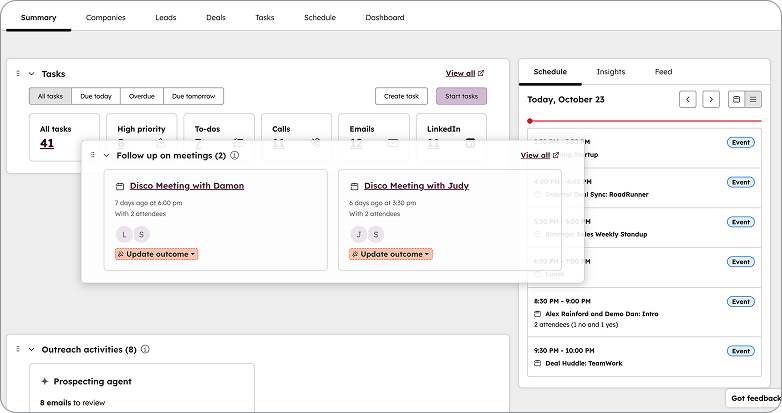
As of late April, HubSpot replaced the Sales Workspace's custom-built interfaces, the Prospects tab, Deals tab, and task playlists, with native CRM index pages. This isn't a cosmetic refresh. It's a fundamental architecture change.
Why this matters for your team
Previously, your Sales Workspace and Smart CRM were two separate systems. That meant configuring views twice, training reps on two interfaces, and waiting for new CRM features to be rebuilt for the workspace. Now they're unified: one setup, one interface, one experience that stays current automatically.
The key changes:
The Summary page now supports drag-and-drop card reordering, collapsible cards, and two new cards that surface stalled deals and meetings needing follow-up. Guided Actions have been renamed to Suggested Tasks, with smarter, fewer recommendations that auto-remove when stale.
CRM index pages replace custom tabs. The Prospects tab is gone replaced by dedicated CRM pages for Companies, Leads, and Deals. The Deals interface now includes top-level analytics and board view with a configurable side panel showing Deal Insights, Deal Score, and Breeze Summary.
Task queues now use CRM task queues with full record access, and all object configurations have moved to their respective settings pages.
What you should do now: All accounts have been automatically switched. If your team needs more time, admins can revert via Sales Workspace Settings until 18 May.
Available for: Sales Hub Professional and Enterprise.
Lupo's take: This is the most significant Sales Workspace change since it launched. The unification removes a real source of friction, no more duplicate configuration, no more waiting for workspace-specific feature rollouts. If you've been putting off cleaning up your CRM views, now is the time. Need help restructuring your sales views? Talk to Lupo Digital.
2. Email Workflows: Trigger Automation From 1:1 Emails
What is it?
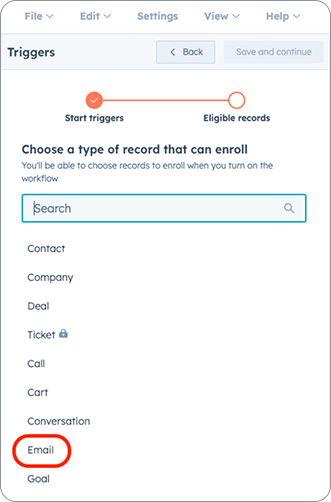
You can now create workflows based on the 1:1 email object. This means you can trigger automation based on events like emails being created, then use workflow actions to build automatic internal processes around email management.
Why this matters
Until now, email-based automation was limited to marketing emails. This update opens the door to automating internal processes triggered by actual sales and service email activity, think automatic task creation when a rep sends a follow-up, or internal notifications when a key account receives a reply.
How to set it up: From the Workflows tool, click "Create workflow" > "From scratch" > choose the Email object > set your trigger based on email events or properties.
Important note: This does not include the ability to send 1:1 emails from workflows, only to trigger automation based on emails that already exist in the CRM.
Available for: Professional and Enterprise tiers across Marketing Hub, Sales Hub, Service Hub, Data Hub, and Smart CRM.
Lupo's take: This is a quiet powerhouse. The ability to trigger workflows from 1:1 email activity creates opportunities for internal process automation that simply didn't exist before. We'd recommend starting with notifications for high-value accounts.
3. Breeze Assistant Now Lives in Slack
What is it?
Breeze Assistant is now available directly inside Slack. Using a simple @-mention, you can ask questions about your CRM data, summarise conversations, prepare for upcoming meetings, and create tasks or notes in HubSpot — without leaving Slack.
Why this is a game-changer
Your team already lives in Slack. Now they can access HubSpot insights, get instant CRM summaries, and take action without switching tools. This removes one of the biggest friction points in CRM adoption: the context switch.
What you can do:
-
@HubSpot(Breeze) summarise the deal with Acme Corp
-
@HubSpot(Breeze) summarise this thread
-
@HubSpot(Breeze) create a task to follow up with Sandy
-
@HubSpot(Breeze) prep me for my 2pm meeting with Uniqlo
Breeze analyses the request, retrieves the relevant HubSpot data, and responds directly in the Slack thread. It only responds when explicitly invoked, no channel noise.
How to get started: Install or upgrade the Slack app for HubSpot from the Marketplace. This feature is in public beta.
Available for: All hubs and tiers.
Lupo's take: This is the integration we've been waiting for. The practical impact is massive, reps preparing for calls, managers checking deal status, anyone capturing follow-ups, all without leaving where they're already working. If your team uses Slack, activate this immediately.

4. Video Editor Expands to Marketing Hub Pro and Enterprise
What is it?
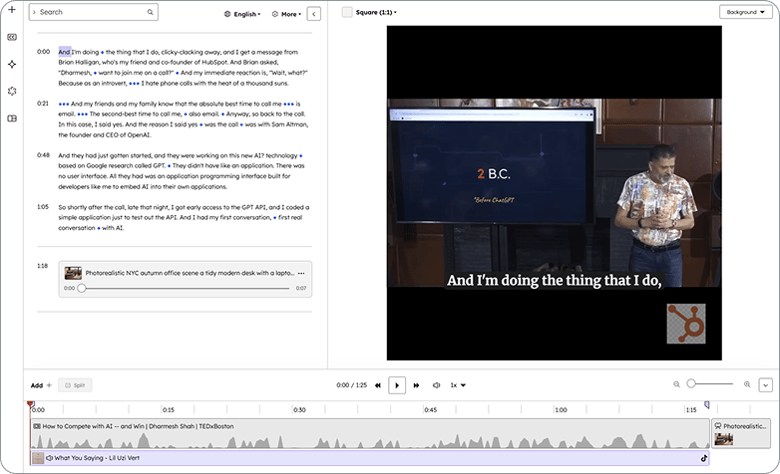
The HubSpot video editor, previously limited to Content Hub is now available for Marketing Hub Professional and Enterprise. You can trim videos, add branding, overlay text and images, add trending TikTok audio tracks, generate captions, and translate content, all without leaving HubSpot.
Why this matters for your marketing team
Creating polished short-form video for TikTok and social previously required jumping between HubSpot and external editing tools. Now, the full workflow, clip, edit, brand, add trending audio, publish lives inside your social composer.
Key capabilities:
-
Trim and crop with transcript-based editing
-
Add trending TikTok audio directly from your connected account
-
Text overlays, images, and branding with drag-and-drop positioning
-
AI voice isolation to remove background noise
-
Multi-language translations for captions
-
Templates to save and reuse design styles
-
Multiple aspect ratios: Portrait (9:16), Landscape (16:9), Square (1:1)
How to access it: Navigate to Marketing > Social, create a post with a video, and click the pencil icon. Or use the File Manager to edit any video directly.
Available for: Marketing Hub Professional and Enterprise.
Lupo's take: Trending audio is one of the biggest drivers of reach on TikTok. Having that access alongside the editor inside HubSpot means your team can move faster on timely content. This closes a real gap in the HubSpot marketing workflow.
5. Breeze Assistant Projects: Persistent Context Across Conversations
What is it?
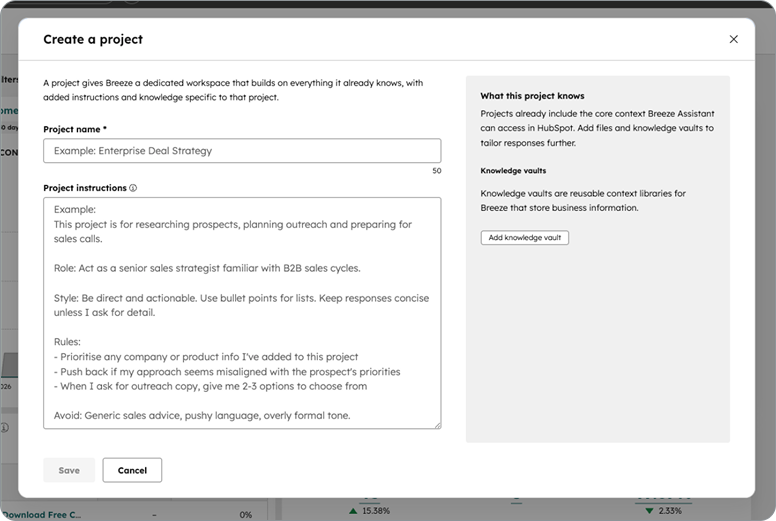
Projects are dedicated workspaces within Breeze Assistant that group related chats with shared instructions and connected knowledge. Within a project, Breeze applies this context across all threads, staying focused, consistent, and tailored to the task.
Why this matters
If you've ever had to repeat context and instructions across multiple Breeze chats to get relevant answers, this solves it. Projects keep instructions and relevant information in one place, so Breeze delivers consistent, tailored responses across related work without repetition.
How to use it: Create a project by defining a title and optionally adding instructions and relevant information. Start new chats within the project, or move existing chats in and out.
Available for: All hubs and tiers.
Lupo's take: Think of Projects as giving Breeze a "brief", like handing a creative team a strategy document that stays pinned to every conversation. This is especially powerful for campaign planning, content series, or any initiative that spans multiple sessions.
6. Email Management Actions Inside the Editor
What is it?
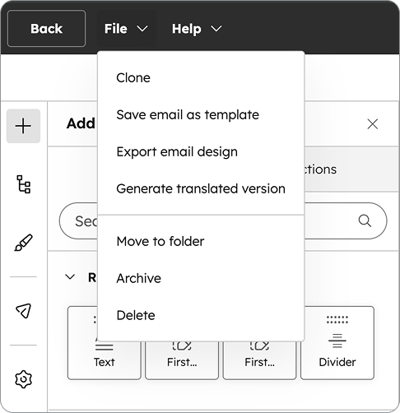
You can now clone, translate, move to a folder, archive, and delete emails directly from within the Email Editor. No more saving, navigating back to the listing page, performing the action, then finding your way back.
Why this matters
It sounds small, but the save-exit-find-act-reopen loop adds up. This update keeps you in your creative flow. Clone opens in a new tab. Translate creates a multi-language variation in a new tab. Move to folder updates in the background. It's all about momentum.
How to access: In the Email Editor, click File in the top navigation bar to see all available actions.
Available for: All Marketing Hub tiers including Free.
Lupo's take: A quality-of-life improvement that will save your team real time, especially if you're running multi-language campaigns or managing a large email library.
7. Write and Send Emails Directly From Breeze Assistant
What is it?
Breeze Assistant can now draft, refine, and send 1:1 emails or replies directly from CRM records. It uses CRM data, past email conversations, and available templates to generate ready-to-send emails, pre-filled with recipients, subject, and body, that you can insert into the CRM composer.
Why this matters
Email is one of the most frequent front-office tasks, yet it remains fragmented. Gathering context, iterating on drafts, then completing the send step outside of Breeze breaks the flow. This feature closes that gap from "draft this email" to "ready to send" in one seamless step.
Who should care: Ask Breeze to draft or reply to an email. It gathers CRM context, previous conversations, and templates automatically. Review, refine with follow-up instructions, then insert directly into the CRM composer with all fields pre-filled.
Available for: All hubs and tiers.
Lupo's take: This is Breeze becoming genuinely useful for daily sales activity. The fact that it pulls from CRM data and past conversations means the drafts are context-aware, not generic. A real time-saver for reps handling high volumes of outreach.
8. Association Settings Move to the Data Model Builder
What is it?
All association configuration, labels, limits, additional associations, and new associations to custom objects, now lives in the Data Model Builder. The previous association settings page has been retired.
Why this matters
Managing your data model across separate settings pages made it hard to see how objects and associations connect. Now you can visualise, configure, and edit your entire data model from a single place, a proper visual interface for understanding relationships across your CRM.
How to access: Navigate to Data Management > Data Model, then click Edit Data Model. If you visit the old Associations tab, you'll see a redirect to the builder.
Available for: All hubs and tiers can view. Custom labels and limits require Professional or Enterprise.
Lupo's take: If you've ever struggled to explain your CRM data model to a new team member, this visual builder is a gift. It's also a strong signal that HubSpot is investing heavily in making data architecture accessible to non-technical users.
What These Updates Mean for Your Business
May's updates follow a clear pattern: HubSpot is removing the gaps between where work happens and where data lives. Sales Workspace merges with CRM. Breeze moves into Slack. Video editing comes to the marketing workflow. Email actions stay inside the editor.
For businesses running on HubSpot, this means less context-switching, faster execution, and fewer reasons to leave the platform. The teams that activate these features early will compound the productivity gains month over month.
Need Help Activating These Features?
At Lupo Digital, we help businesses turn HubSpot updates into measurable performance improvements, not just new buttons inside your portal.
Whether you need help restructuring your Sales Workspace, setting up email workflows, or training your team on Breeze Assistant, we're ready to help.
Book a chat
There’s nothing to lose from a 10 minute connect-call. Tell us your pain... let’s see if we can help...


And if you want these updates delivered to your inbox every month, subscribe to Product Features of the Month
Related reading:

Written by Glenn Miller
An exceptionally experienced digital marketer, proactive and future-forward thought leader, I deliver exceptional customer experiences, industry leading digital strategy and superior marketing results.

