

September polished the platform; October organises its AI. The headline is Agent Hub until now HubSpot's agents worked across your go-to-market in separate places, and this brings them together in one view. Add custom agents that anyone can build, connectors that let Breeze reach your other tools, and a run of creator-friendly upgrades, and October is one of the biggest AI releases of the year. Here's the full breakdown.
HubSpot's October 2026 updates are led by Agent Hub - one place to see, build, and automate every AI agent across your go-to-market. Alongside it: custom agents in Agent Builder (now available from Starter and up), a no-credit Data Agent Playground, Breeze Projects connectors (Amplitude, Notion, Gong, Asana, Linear, G2), natural-language segment creation and mobile email drafting in Breeze, a redesigned Customer Agent guidelines UI, AI smart framing in the video editor, a Breeze Context Panel, and Proactive Insights in Partner Center. This roundup explains what shipped, who each update is for, and what Australian teams should action first.
The Biggest Changes
-
Agent Hub is here: one place to see every AI agent, organised by outcome, build new ones, and automate the work between them.
-
Custom agents go mainstream: Agent Builder now lets Starter-and-up customers build no-code custom agents, with run limits and a simulation mode to control credit spend.
-
Breeze Projects connectors: connect Amplitude, Notion, Gong, Asana, Linear and G2 so Breeze can pull data and write back inside a project.
-
Breeze gets more capable: create segments by describing them, draft emails on mobile, and see a new Context Panel showing exactly what Breeze used.
-
AI smart framing: automatically keep speakers in frame when cropping horizontal video to vertical.
-
Plus: Data Agent Playground, redesigned Customer Agent guidelines, Breeze-in-Slack's new home, and Proactive Insights for partners.
1. Agent Hub: One Place to Run Your AI Team
What is HubSpot Agent Hub?
Agent Hub is a single home for every AI agent running your go-to-market, organised around the outcomes they drive build demand, win deals, delight customers, and scale growth. You can see what every agent is doing, build new ones, and automate the work in between, all in one place.
Why it matters
HubSpot's agents were already working across your funnel, but in separate places, so it was hard to see the full picture. Agent Hub brings them together so you can see every agent at a glance, understand the outcomes they're driving, and build what's next without hunting through settings.
How it works
Open Agent Hub to see HubSpot-built agents mapped across your GTM journey from awareness to retention. Each card shows the agent, whether it's active or inactive, and a primary action active agents display the outcomes they're driving (like the Customer Agent's resolution rate), while inactive ones show what they'd deliver with an Activate button. It also includes Agent Builder, a new workflow builder (Pro+), build-with-Breeze in plain language, suggested automation templates, and run history.
Available for: Starter, Professional and Enterprise across the suite (runs on HubSpot credits).
Lupo's take: This is the one to explore first. As HubSpot leans harder into agents every month, having a single command centre to see what's running and what it's achieving is exactly what teams need. Start by reviewing which agents are inactive there's likely value sitting switched off. Talk to Lupo Digital.
2. Custom Agents in Agent Builder Are Live
What is it?
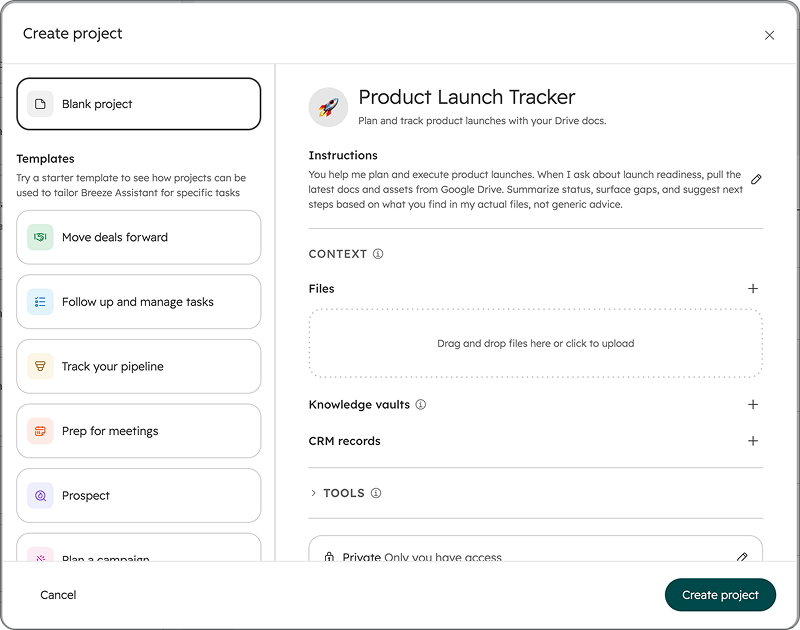
Agent Builder now lets you build custom agents tailored to your business using your own instructions, tools, and knowledge, on the customer data already in your CRM plus a new automation canvas that connects agents, actions, and triggers in one place. No code required.
Why it matters
Custom agents let you build AI that works the way your business does. You get full control over what the agent knows, how it behaves, and where it acts turning AI from a helpful add-on into a scalable advantage across your front office. And with Breeze Assistant, you don't start from scratch: describe what you need and it builds the agent for you.
How it works
Custom agents run on HubSpot credits, and you're in control of spend set run limits per agent, monitor and cap total usage, and use simulation mode to estimate the cost of a run before going live without consuming credits. Users need Agent access to build; workflow editing needs Edit or Super Admin permissions.
Available for: Starter tiers and above (previously Pro+).
Lupo's take: The big news here is custom agents reaching Starter this is no longer an enterprise-only capability. Use simulation mode before you switch anything live; it's the smart way to understand credit cost before you commit.
3. Breeze Projects: Connect Your External Apps
What is it?
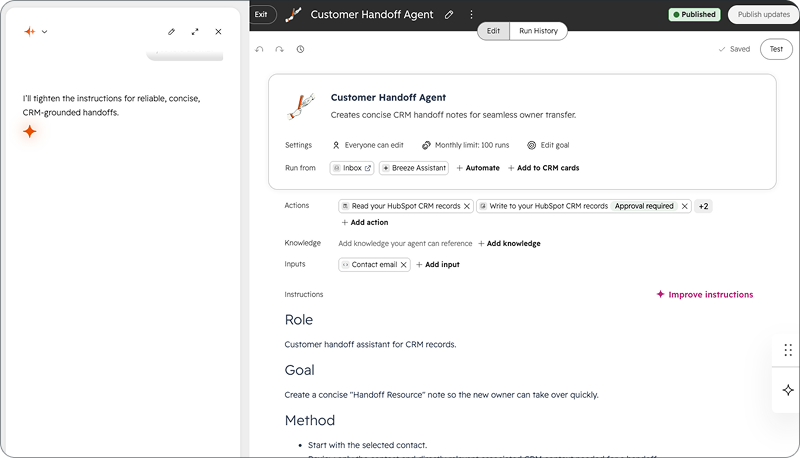
Breeze Projects now supports connectors to external apps. Connect services like Amplitude, Notion, Gong, Asana, Linear and G2 directly to a project, and Breeze can pull data, take actions, and write back, all from within the project's conversation.
Why it matters
Projects already held your instructions, files and CRM references, but Breeze couldn't reach the external systems where your work actually lives your analytics, your project tracker, your call recordings. With connectors, a project becomes a complete workspace: ask Breeze to pull this week's metrics from Amplitude, summarise the trends, and drop the summary into Notion, all in one conversation. Set it up once in the project instructions and every chat benefits.
How it works
Open a project, add instructions that reference the connector, then expand the Tools section and add connectors under the "+" button. Connectors named in your instructions are required and on by default; others you toggle individually. A project can use multiple connectors at once and coordinate across them in one conversation. Available at launch: Amplitude, Asana, G2, Gong, Linear, Notion with Google Drive, Box, Dropbox, Zoom, Atlassian and Slack rolling out through the beta.
Available for: all hubs and tiers.
Lupo's take: This is a genuine step toward Breeze as a true workspace rather than a CRM-only assistant. If your team lives in tools like Notion or Gong, connecting them to a project removes a real daily friction just set the connector context in the project instructions once and let it carry across threads.
4. Data Agent Playground
What is it?
Data Agent Playground is a dedicated area in HubSpot where you can pick a pre-built scenario, run a Data Agent test against live CRM records at no credit cost, and see the real output with populated Smart Properties and insights.
Why it matters
It's a fast, reliable way to evaluate and demonstrate Data Agent's value using your real data, without custom setup, so you can build trust in the output before any credits are charged or data is changed in your CRM.
How it works
Go to the Data Agent homepage, open the Playground sub-tab, choose a scenario (prospect fit scoring, lead qualification, engagement insight extraction), pick a data framework, and run the test against live records at no cost. Results show pre-existing and enriched fields side by side, with a clear call-to-action to set up a real workflow. Note: results are ephemeral in v1 (no saving/exporting).
Available for: Starter, Professional and Enterprise across Data, Marketing, Content, Sales, Service and Smart CRM.
Lupo's take: A smart "try before you spend" feature. If you've been curious about Data Agent but wary of credit cost, this is the no-risk way to see what it does with your actual records.

5. Breeze Assistant in Slack Moves to Slack's New Agent Experience
What is it?
Breeze Assistant now has a dedicated home in the Messages tab of the HubSpot app in Slack, with a cleaner layout and suggested prompts so you can get started without typing from scratch.
Why it matters
This moves Breeze onto Slack's current, supported platform making it easier to find and use, and laying the groundwork for a more interactive Breeze experience in Slack in future releases.
How it works:
Find Breeze in the Messages tab of the HubSpot Slack app; suggested prompts sit at the top. You can message it directly and continue the conversation without re-mentioning it (in channels and threads you still @mention it each time). A workspace admin needs to reconnect the HubSpot Slack app to grant the updated permissions.
Available for: all hubs and tiers.
Lupo's take: If your team already uses Breeze in Slack, flag the reconnect to your workspace admin so you get the new experience. Everything keeps working until then but the new layout and prompts are worth the switch.
6. Create Segments in Breeze Assistant
What is it?
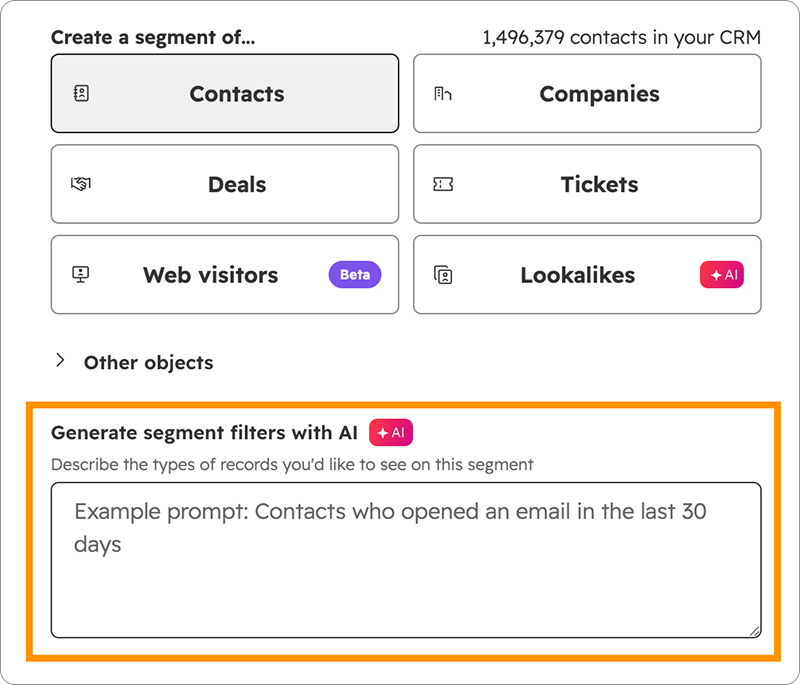
Breeze Assistant can now create segments from natural-language prompts. Describe the audience you want to reach, and Breeze builds the filter criteria for you.
Why it matters
Instead of manually building every filter from scratch, you describe the audience and Breeze translates it into segment criteria creating segments faster and with far less effort.
How it works:
Open Breeze Assistant, or in the Segments app choose "Create segment" → "Start with AI". Describe the audience (e.g. "contacts who viewed a pricing page in the last 30 days"), review the suggested criteria, refine, and save. This replaces the older "Generate segment filters with AI".
Available for: all hubs and tiers.
Lupo's take: A real time-saver for marketers who build a lot of lists. Describe the audience in plain English and sanity-check the filters it builds much faster than clicking through criteria by hand.
7. A Redesigned Guidelines UI for Customer Agent
What is it?
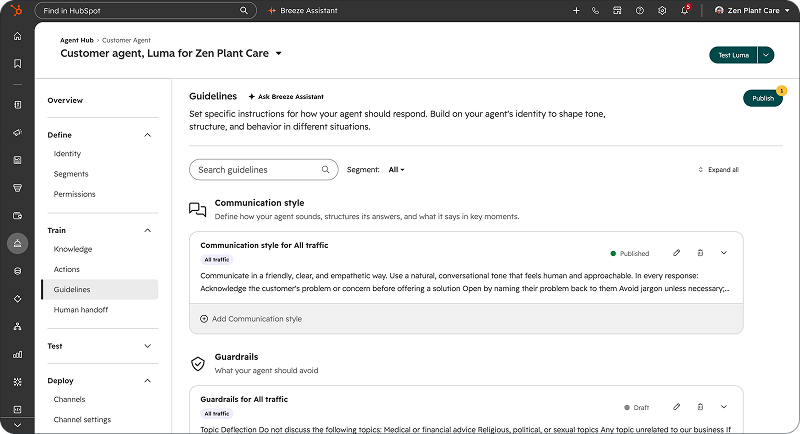
The Customer Agent guidelines interface has been redesigned with a card-based layout that supports multiple guidelines per category, audience-segment targeting, and preset starting templates.
Why it matters
The old fixed-form interface made it hard to organise guidelines across different audience types. Now you can create and name multiple guidelines per category, assign them to specific segments, and filter or search across all of them in one view making complex configurations far easier to manage.
How it works:
On the Customer Agent Guidelines page, choose from three categories (Communication style, Guardrails, Custom), create multiple named guidelines, and assign them to audience segments. First-time users get a "Pick a starting point" grid that creates a bundle automatically. Save explicitly (draft/published status shown); existing guidelines migrate automatically with no action needed.
Available for: all Professional and Enterprise customers.
Lupo's take: If you run a Customer Agent across different audiences, segment-targeted guidelines are a meaningful upgrade you can finally tailor tone and guardrails per audience instead of one-size-fits-all.
8. Compose Emails on HubSpot Mobile With Breeze Assistant
What is it?
You can now compose emails in the HubSpot mobile app with Breeze Assistant. Describe what you want to say, and Breeze drafts the subject line and body adjust tone, tweak length, or regenerate until it's right, then insert it.
Why it matters
Writing emails on mobile is slow, especially between meetings or right after a call. Breeze turns a quick idea into a complete, professional draft in seconds, so you can send clear, contextual emails from your phone instead of waiting until you're back at your desk meaning faster follow-ups for sales and customer-facing teams.
How it Works
Open a new email draft in the mobile app, tap Generate draft, enter a short prompt, and review the subject and body. Tap Re-prompt for a different version or Insert to add it to the composer, then edit or send.
Available for: all hubs and tiers (update the HubSpot mobile app on Android or iOS).
Lupo's take: Genuinely useful for anyone doing follow-ups on the go. A quick prompt beats thumb-typing a full email between meetings just give each draft a quick read before you hit send.
9. AI Smart Framing in the Video Editor
What is it?
When you crop a horizontal video to vertical in the video editor, AI smart framing automatically keeps people in frame, as the speaker moves, the crop follows to keep them centred, with no manual keyframing.
Why it matters
The most common way teams make social clips is trimming long-form content like webinars or podcasts but those are almost always horizontal (16:9), while Instagram, TikTok and LinkedIn want vertical (9:16). When you crop down, speakers walk out of frame and the clip becomes unusable. Smart framing solves that automatically, making it practical to turn any recording into a polished vertical clip.
How it works
Enable Smart Framing from the AI tools panel in the editor's left toolbar. Once processed, it keeps people in frame across crops as they move; videos with multiple people are shown in a grid so each person stays highlighted.
Available for: Content Hub and Marketing Hub, Professional and Enterprise.
Lupo's take: This is a standout for any team repurposing webinars and podcasts into social clips, it removes the single most tedious part of vertical cropping. Directly relevant to how we produce short-form video.
10. Breeze Assistant Context Panel
What is it?
The Context Panel is a sidebar in Breeze Assistant that shows exactly what information Breeze used to generate its responses in real time. You can see which CRM records, memories, brand guidelines, company details and other sources Breeze referenced, all in one place.
Why it matters
When Breeze gives a great answer, it's usually because it drew on things you set up your brand voice, CRM data, company profile, but until now there was no way to see that happening. The Context Panel makes Breeze's reasoning visible, so you can confirm it's using the right information, catch when something's missing, and trust that your setup is working.
How it works
As Breeze responds, the panel updates in real time, showing each source as it's drawn on; the sources stay visible afterwards for review. If a source is missing, that's a signal Breeze didn't have access to it — follow the link at the bottom of the panel to fill the gap. Click the Expand icon, then "show context", to enlarge the panel.
Available for: all hubs and tiers.
Lupo's take: A quietly important transparency feature. Being able to see why Breeze answered the way it did and spot missing context is how you move from trusting the output blindly to actually improving your setup.
11. Proactive Insights in Partner Center
What is it?
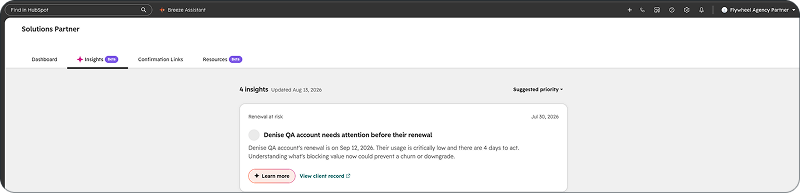
A new Insights tab in Partner Center that surfaces proactive, personalised signals about a partner's clients and account. At launch: Renewal at Risk (a managed client renewing within 90 days with low usage) and Commission at Risk (a shared deal in progress or closed won but with incomplete bank and tax forms).
Why it matters
Partners manage large books of business with no proactive signal telling them which clients need attention right now, so at-risk renewals and commission paperwork gaps go undetected without manual checks. Proactive Insights surfaces these automatically so partners can act immediately.
How it works
The Insights tab appears when you have active insights. Each card explains what's happening and gives a direct next step, "View client record" for a renewal risk, "Go to documents" for a commission gap. Insights are ordered by urgency and dismiss automatically once resolved (checked weekly).
Available for: HubSpot Partners.
Lupo's take: As a HubSpot Diamond Partner, this is one we'll use ourselves, an automatic heads-up on at-risk renewals and commission paperwork is exactly the kind of signal that's easy to miss in a big book of business.
How These Updates Affect Your Team
| Team | Key updates | What to do next |
| Marketing | Agent Hub, Breeze segment creation, Data Agent Playground, smart video framing | Review inactive agents in Agent Hub; try segment-by-prompt |
| Sales | Custom agents, mobile email drafting, Data Agent Playground | Pilot a custom agent in simulation mode; use mobile drafting for follow-ups |
| Service | Redesigned Customer Agent guidelines, Context Panel | Rebuild guidelines by audience segment; review the Context Panel |
| Ops / Admin | Agent Builder, Breeze Projects connectors, Slack reconnect | Set agent run limits; reconnect the Slack app; wire up project connectors |
Which Updates to Prioritise First
| Priority | Update | Why |
| High | Agent Hub + custom agents | The biggest launch a single home for AI, now buildable from Starter |
| High | Breeze Projects connectors | Turns Breeze into a true cross-tool workspace |
| Medium | Data Agent Playground + smart video framing | Real, low-risk value for data and creative teams |
| Low | Segment creation, mobile email, Context Panel, guidelines UI | Useful quality-of-life wins; action as capacity allows |
Frequently Asked Questions
What are the HubSpot October 2026 updates?
The main updates are Agent Hub (one place for all your AI agents), custom agents in Agent Builder (now from Starter up), Breeze Projects connectors, the Data Agent Playground, natural-language segment creation and mobile email drafting in Breeze, a redesigned Customer Agent guidelines UI, AI smart framing in the video editor, the Breeze Context Panel, and Proactive Insights in Partner Center.
What is HubSpot Agent Hub?
Agent Hub is a single home for every AI agent across your go-to-market, organised by the outcomes they drive. You can see what each agent is doing, activate inactive ones, build custom agents, and automate the work between them all from one view.
Can I build custom AI agents in HubSpot?
Yes. Agent Builder lets you build no-code custom agents using your own instructions, tools and CRM data, and it's now available from Starter tiers up. Custom agents run on HubSpot credits, with run limits and a free simulation mode to estimate cost before going live.
What connectors does Breeze Projects support?
At launch: Amplitude, Asana, G2, Gong, Linear and Notion, with Google Drive, Box, Dropbox, Zoom, Atlassian and Slack rolling out through the beta.
How do I crop a horizontal video to vertical in HubSpot?
Use AI smart framing in the video editor's AI tools panel. It automatically keeps people in frame as they move when cropping 16:9 video to 9:16, so you don't have to keyframe manually.
Are these updates available in Australia?
Yes. These are platform-wide updates available to Australian customers on the relevant hubs and tiers availability depends on your subscription, not your location.
Which October update should I set up first?
Start with Agent Hub to see every AI agent in one place and activate what's switched off, then explore custom agents in Agent Builder (using simulation mode to manage credit cost).
Need Help Putting These Updates to Work?
Lupo Digital is an AI-first, human-led HubSpot Diamond Solutions Partner in Sydney. We help Australian businesses turn HubSpot updates like these into measurable results from setting up Agent Hub and custom agents to building an AEO strategy that gets your brand cited in AI answers.
Book a chat
There’s nothing to lose from a 10 minute connect-call. Tell us your pain... let’s see if we can help...


And if you want these updates delivered to your inbox every month, subscribe to Product Features of the Month.
Related reading:

Written by Glenn Miller
An exceptionally experienced digital marketer, proactive and future-forward thought leader, I deliver exceptional customer experiences, industry leading digital strategy and superior marketing results.

