

Every month HubSpot releases dozens of product improvements. Most businesses read these updates, nod, and move on.
That’s a mistake.
Many of these updates are not just product tweaks, they directly affect how marketing campaigns run, how sales teams operate, how data is analysed, and how secure your CRM environment is.
In April, several HubSpot updates stand out because they remove operational friction and unlock capabilities that many companies previously needed custom workarounds to achieve.
This article breaks down the HubSpot updates businesses should actually act on this month, what problems they solve, and when it may make sense to rethink your current HubSpot setup.
1. AI Website Page Creation Is Now Built Into the Normal Workflow
What changed
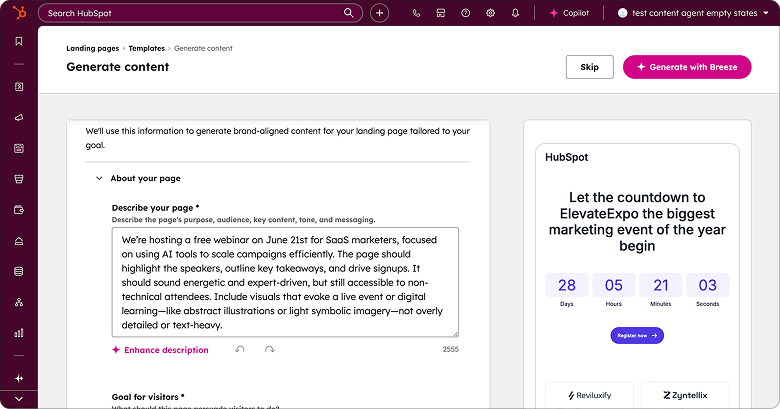
HubSpot has unified AI page generation and manual page creation into a single workflow. Previously, AI page generation was only available during the initial onboarding process.
Now, marketers can generate website pages with AI anytime from the page creation interface using HubSpot Breeze.
Why this matters for businesses
Many marketing teams struggle with one of the most common HubSpot bottlenecks: content production speed.
Launching campaign pages, product pages, or landing experiences often gets delayed because teams need copywriting, approvals, and design resources.
By making AI page generation part of the normal page creation process, HubSpot is essentially turning website production into a faster, repeatable marketing workflow.
Who should care
-
Marketing leaders managing campaign execution
-
Content teams responsible for website updates
-
Growth teams running high-frequency experiments
What problem this solves
Slow page creation often limits campaign velocity. When every campaign requires manual page writing, testing becomes difficult.
This update allows teams to generate structured page content instantly and then refine it instead of starting from scratch.
What action businesses should take
Review your current page creation process and identify where AI generation could accelerate campaign launches.
Organisations running multiple campaigns each month should consider building AI-assisted page templates to standardise execution.
When expert help may be needed
AI page generation is powerful, but without proper brand guidelines and content frameworks it can create inconsistent messaging. Companies scaling content production often benefit from structured AI content workflows inside HubSpot.

2. Multi-Account Reporting Finally Solves a Major HubSpot Limitation
What changed
HubSpot now allows organisations to create reports that combine data across multiple HubSpot accounts.
Why this matters for businesses
This is a major update for companies operating:
-
Multiple brands
-
Regional HubSpot portals
-
Franchise or multi-entity organisations
Previously leadership teams, had to manually export data or log into multiple portals to understand performance across the business.
Now reporting can be centralised.
Who should care
-
Marketing executives managing multiple brands
-
Revenue leaders overseeing multiple regions
-
RevOps teams responsible for reporting and analytics
What problem this solves
Lack of unified reporting often leads to fragmented decision-making. Teams optimise campaigns locally without understanding global performance trends.
Multi-account reporting provides a true organisational performance view.
What action businesses should take
If your organisation uses multiple HubSpot portals, now is the time to review whether your reporting structure needs consolidation.
Standardised reporting dashboards across accounts can significantly improve strategic planning.
When expert help may be needed
Connecting multiple accounts and building meaningful dashboards requires thoughtful data modeling. Many companies benefit from RevOps architecture planning before implementing multi-account reporting.

3. Breeze Assistant Can Now Analyze Real Business Files
What changed
HubSpot Breeze Assistant now supports many more file types including:
-
DOCX
-
CSV
-
PPTX
-
XLSX
-
TXT
-
JSON
-
Markdown and log files
Previously, the assistant mainly supported PDFs and images.
Why this matters for businesses
AI becomes far more useful when it can access the real files your team works with.
Sales call transcripts, spreadsheet exports, and strategy documents can now be analysed directly within HubSpot AI conversations.
Who should care
-
Sales teams analysing call insights
-
Marketing teams reviewing campaign data
-
Operations teams working with exports and reports
What problem this solves
Many teams previously had to copy and paste information into AI tools to analyse it.
Now that process is significantly faster.
What action businesses should take
Start integrating internal documents into your AI workflows.
For example:
-
Analyse sales call transcripts for objections
-
Summarise campaign reports
-
Generate insights from CSV exports
When expert help may be needed
To unlock real value, companies should build AI usage frameworks so teams use Breeze consistently rather than randomly experimenting.


4. Membership Visibility Is Now Built Into Contact Records
What changed
HubSpot introduced a new CRM card that displays a contact’s membership access groups directly inside the contact record.
Why this matters for businesses
Organisations running private content, customer portals, or membership programs often struggle with visibility.
Previously, support or success teams had to navigate away from the contact record to check membership access.
Now the information is visible immediately.
Who should care
-
Customer success teams
-
Support teams managing user access
-
Content teams managing gated resources
What problem this solves
This update removes a common workflow interruption: navigating between CRM records and membership settings.
Support requests related to account access can now be handled much faster.
What action businesses should take
Teams managing gated content should update their CRM layouts to include this card.
This improves operational efficiency for support and customer success workflows.
5. Sales Teams Can Finally Simplify the Gmail Toolbar
What changed
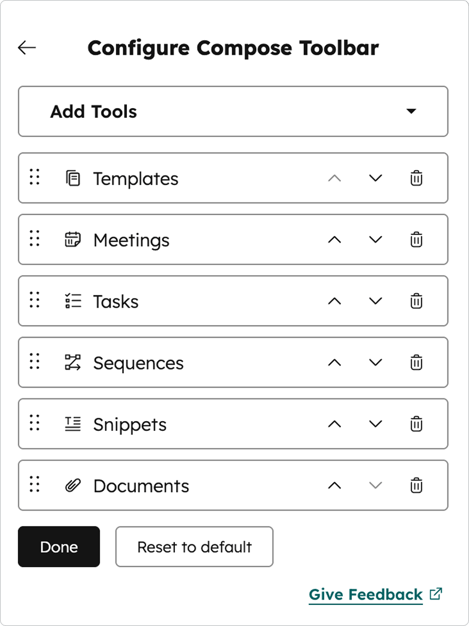
Sales users can now customise which tools appear in the HubSpot Gmail toolbar.
Why this matters for businesses
Sales teams often work directly from email. Overloaded toolbars slow down workflows and make important tools harder to find.
Customisation allows teams to focus on the tools they actually use.
Who should care
-
Sales representatives
-
Sales managers
-
Revenue operations teams
What problem this solves
Too many tools create unnecessary friction during everyday sales activity.
Simplifying the interface helps reps stay focused on conversations and follow-ups.
What action businesses should take
Sales leaders should review which HubSpot tools are actually used during email workflows and customise the toolbar accordingly.
6. Campaigns Can Now Be Restored After Deletion
What changed
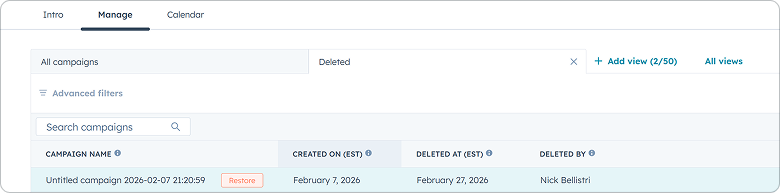
HubSpot now allows users to restore campaigns that were deleted within the past three months.
Why this matters for businesses
Marketing teams sometimes delete campaigns during cleanup or restructuring and later realise they need historical data.
Previously this meant rebuilding the campaign from scratch.
Now deleted campaigns can be recovered.
Who should care
-
Marketing teams running multiple campaigns
-
Operations teams managing campaign data
What problem this solves
Accidental deletion used to result in lost campaign structures and reporting associations.
This update adds a safety net.
What action businesses should take
Marketing teams should review their campaign governance processes and use the restore feature when cleaning up historical campaigns.
7. HubSpot Introduces Passkeys for More Secure Login
What changed
HubSpot now supports passkeys as a login verification method.
Why this matters for businesses
Security threats targeting CRM systems continue to increase.
Passkeys provide a stronger authentication method than traditional password and 2FA combinations.
Who should care
-
IT leaders
-
RevOps administrators
-
Businesses handling sensitive CRM data
What problem this solves
Password-based authentication remains vulnerable to phishing and credential theft.
Passkeys significantly reduce these risks.
What action businesses should take
Organisations should review their HubSpot security policies and consider enabling passkey authentication where possible.

What These Updates Really Mean for HubSpot Users
Several themes stand out across the April updates:
-
AI is becoming embedded in everyday workflows
-
HubSpot is improving operational efficiency across teams
-
Reporting and visibility across accounts are improving
-
Security and access management are becoming stronger
For businesses that rely on HubSpot as their core growth platform, these improvements are not just product enhancements, they are opportunities to improve marketing execution, sales productivity, and reporting clarity.
And if you missed it, you can revisit the HubSpot March 2026 Update anytime.
Book a chat
There’s nothing to lose from a 10 minute connect-call. Tell us your pain... let’s see if we can help...



Written by Glenn Miller
An exceptionally experienced digital marketer, proactive and future-forward thought leader, I deliver exceptional customer experiences, industry leading digital strategy and superior marketing results.

